AVAYA J100

Avaya · J100 Series · Accessory
J100 Expansion Module for Avaya J179

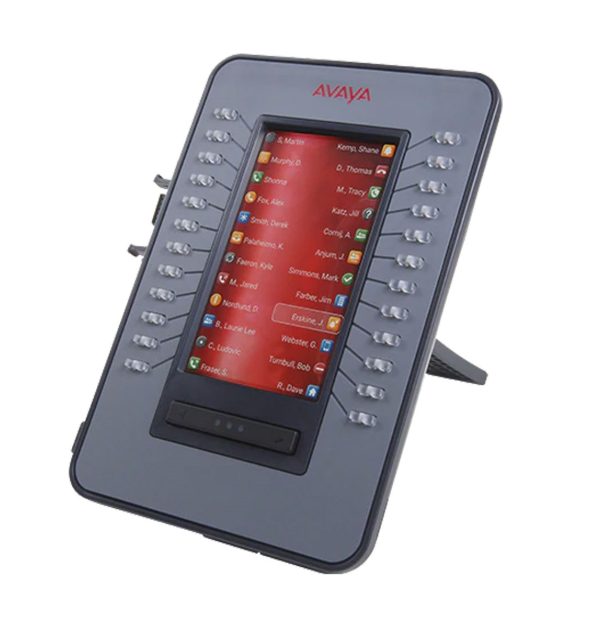
The Avaya J100 Expansion Module adds 24 programmable buttons and a 4.3″ colour display to your Avaya J179 or J189, enabling users to monitor more calls, manage more contacts, and access more features — all from one glance. It is t…

4.3″ (480 × 272) Display
HD Audio
PoE
Avaya Cloud Ready
24

Extra Buttons
4.3″

Colour Screen
J179

Compatible
Categories: , Brand:
Description

Description

Avaya · J100 Series · Accessory
Avaya J100-EM
J100 Expansion Module for Avaya J179
4.3″ (480 × 272) Display
24 programmable buttons Keys
HD Audio
PoE Powered
Avaya Cloud Ready
24

Extra Buttons
4.3″

Colour Screen
J179

Compatible
Product Overview
What Is the Avaya J100-EM?

The Avaya J100 Expansion Module adds 24 programmable buttons and a 4.3″ colour display to your Avaya J179 or J189, enabling users to monitor more calls, manage more contacts, and access more features — all from one glance. It is the essential add-on for power users who need to go beyond the phone’s built-in key capacity.

Who Is It Designed For?

Users of the Avaya J179 or J189 who need additional programmable keys for BLF monitoring, speed dials, and call management — particularly supervisors, receptionists, and call centre agents.

How Does It Fit Into Your System?

Attaches directly to the side of a compatible Avaya J169, J179, or J189 phone. Powered via the host phone’s PoE connection. Use a 5V DC adapter when attaching additional modules.

Full Spec Sheet
Technical Specifications
🖥️ Display
Screen4.3″ (480 × 272)
TypeColour LCD
BacklitYes
🔌 Connectivity
EthernetN/A — connects via phone
Wi-FiN/A
BluetoothN/A
⚡ Power
PoEPowered via host phone (PoE or 5V adapter for additional modules)
AC AdapterOptional (sold separately)
🔑 Keys & Interface
Prog. Keys24 programmable buttons
Soft KeysN/A
Hard KeysN/A
🔊 Audio
SpeakerphoneN/A
CodecsN/A
HeadsetN/A
💻 Platform
CompatibleAvaya J169, Avaya J179, Avaya J189
ManagementWeb browser / Device Enrollment
MountingDesktop (attaches to host phone)
Why Choose the J100-EM
Key Features
24 Programmable Buttons
24 additional fully programmable keys for BLF, speed dials, call pickup, and feature shortcuts.
4.3″ Colour Display
Full colour screen shows button labels, BLF status, and call information clearly at a glance.
Tri-Colour LEDs
Each button has a dual tri-colour LED indicator for instant visual call status monitoring.
Attaches Directly to Phone
Clicks onto the side of the host phone — no separate power supply needed on PoE.
Inherits Display Properties
The module’s display mirrors the colour properties of the host phone for a consistent visual experience.
Multiple Modules Supported
Connect up to 2 J100 Expansion Modules to the J179, or up to 2 to the J189 (5V adapter required for second module).
Ideal for BLF Monitoring
Monitor the status of colleagues, queues, and lines at a glance — never miss a call or a busy signal.
Simple Installation
Plug-and-play — no additional software or configuration required beyond button assignment.
Professional Desk Setup
Clean, integrated look that matches the J179/J189 design perfectly.
System Compatibility
Works With
Avaya J169
Avaya J179
Avaya J189
Who Benefits Most
Ideal Use Cases
Receptionists & Operators
Monitor every extension in the business and manage calls efficiently with 24 extra BLF keys right beside the phone.
Call Centre Supervisors
Track agent availability and queue status at a glance — no need to switch screens or navigate menus.
Managers with Large Teams
Assign one key per team member for instant BLF visibility and one-touch transfer capability.
High-Volume Users
For anyone who regularly runs out of programmable keys on their J179 — the expansion module solves it instantly.
Accessories
Compatible Add-ons
Compatible With

Avaya J169
One J100 EM supported on J169 via PoE. Use 5V adapter for additional modules.
Compatible With

Avaya J179
Up to 1 J100 EM supported on PoE. Use 5V adapter for additional.
Compatible With

Avaya J189
Up to 2 J100 EMs supported. 5V adapter required for second module.

Ready to Add the Avaya J100-EM to Your Business?

Get in touch with the Comstel ICT team for pricing, availability, or a live demo.

Specifications sourced from Avaya official documentation. Subject to change without notice. Contact Comstel ICT to confirm compatibility for your platform.
Comstel ICT · Authorised Avaya Partner · 1300 070 747 · sales@comstel.com.au