

Description
Avaya · J100 Series · Professional
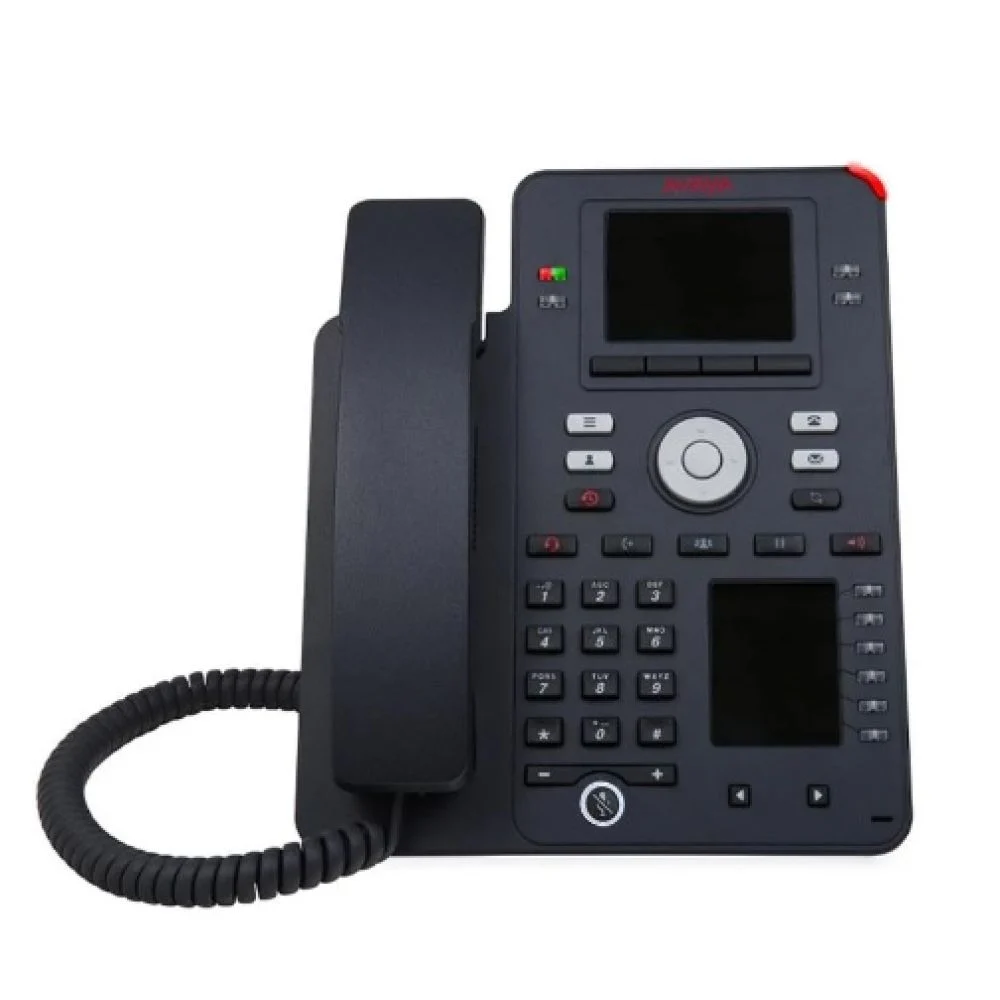
Avaya J159
Professional Dual-Screen Gigabit IP Phone
Primary: 3.5″ Colour + Secondary: 2.3″ Colour Display
48 administrative buttons Keys
HD Audio
PoE Powered
Avaya Cloud Ready
48 administrative buttons Keys
HD Audio
PoE Powered
Avaya Cloud Ready
48
Admin Buttons
Dual
Colour Screens
HD
Audio
Product Overview
What Is the Avaya J159?
The Avaya J159 is a small-form-factor powerhouse — dual colour displays, 48 administrative buttons, USB headset support, and Dual Gigabit Ethernet, all in a compact footprint. It’s built for knowledge workers who need maximum functionality from a minimum desk footprint.
Who Is It Designed For?
Knowledge workers and professionals who need a small-form-factor phone packed with functionality — lots of feature buttons without taking up significant desk space.
How Does It Fit Into Your System?
Compatible with Avaya Aura, Avaya IP Office, and Avaya Cloud Office. PoE powered, zero-touch provisioning via Avaya Device Enrollment Services.
Full Spec Sheet
Technical Specifications
🖥️ Display
ScreenPrimary: 3.5″ Colour + Secondary: 2.3″ Colour
TypeDual Colour LCD
BacklitYes
🔌 Connectivity
EthernetDual Gigabit (LAN + PC pass-through)
Wi-FiOptional (J100 Wireless Module)
BluetoothNot included
⚡ Power
PoEIEEE 802.3af — Class 2
AC AdapterOptional (sold separately)
🔑 Keys & Interface
Prog. Keys48 administrative buttons (24 primary + 24 secondary)
Soft Keys4
Hard KeysHold, Transfer, Conference, Headset, Speaker, Volume, Mute, Messages, Contacts, History, Home
🔊 Audio
SpeakerphoneFull-duplex wideband HD
CodecsG.711, G.722, G.729, Opus
Headset3.5mm (RJ9) + USB
💻 Platform
CompatibleAvaya Aura, Avaya IP Office, Avaya Cloud Office
ManagementWeb browser / Device Enrollment
MountingDesktop or wall mountable
Why Choose the J159
Key Features
Dual Colour Displays
Primary 3.5″ + secondary 2.3″ colour screens give you maximum call and feature visibility without a large phone body.
48 Administrative Buttons
24 primary + 24 secondary programmable buttons — manage multiple lines, speed dials, and BLF all at once.
USB Headset Support
Connect a USB headset directly for hands-free operation — no separate adapter needed.
Wideband HD Audio
Full-duplex speakerphone with G.722 and Opus codecs for premium voice quality.
Dual Gigabit Ethernet
LAN + PC pass-through — reduces desk cabling to a single network run.
Secure SIP
TLS and SRTP encryption built in as standard across all calls.
Optional Wi-Fi
Add the J100 Wireless Module for wireless connectivity.
Calendar Integration
Connects with calendar applications for scheduling and productivity integration.
Easy Deployment
Zero-touch provisioning via Avaya Device Enrollment Services.
System Compatibility
Works With
Avaya Cloud Office
Avaya Aura
Avaya IP Office
Who Benefits Most
Ideal Use Cases
Knowledge Workers
Dual screens and 48 buttons give professionals instant access to all the lines, contacts, and features they need — in a small footprint.
Call Centre Agents
Monitor multiple lines and manage high call volumes efficiently with 48 administrative buttons and dual displays.
Busy Professionals
For users who want maximum phone capability without a large desk phone taking up workspace.
Remote Offices
Compact, powerful, and easy to deploy — ideal for remote or satellite office setups via Avaya Cloud Office.
Accessories
Compatible Add-ons
Note
No Expansion Module
The J159 does not support J100 Expansion Modules. Its 48 built-in buttons provide extensive functionality.
Add-on
J100 Wireless Module
Adds Wi-Fi connectivity to the J159.
Accessory
USB & 3.5mm Headsets
Supports both USB and 3.5mm RJ9 headsets. See Avaya certified headset list.
Ready to Add the Avaya J159 to Your Business?
Get in touch with the Comstel ICT team for pricing, availability, or a live demo.
Specifications sourced from Avaya official documentation. Subject to change without notice. Contact Comstel ICT to confirm compatibility for your platform.
Comstel ICT · Authorised Avaya Partner · 1300 070 747 · sales@comstel.com.au
Comstel ICT · Authorised Avaya Partner · 1300 070 747 · sales@comstel.com.au