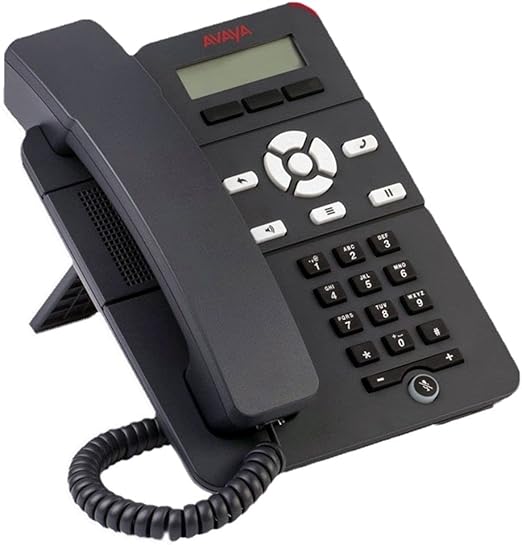
The Avaya J139 is a modern, colour IP phone for everyday business users who need reliable voice communication without complexity. With 12 programmable self-labelling keys, a 2.8″ colour display, Dual Gigabit Ethernet, and HD audio…
The Avaya J139 is a modern, colour IP phone for everyday business users who need reliable voice communication without complexity. With 12 programmable self-labelling keys, a 2.8″ colour display, Dual Gigabit Ethernet, and HD audio, the J139 delivers a clean, professional desk phone experience at a practical price point.
Who Is It Designed For?
Office workers who need essential voice features with a modern colour display, personalisation options, secure SIP communication, and an easy-to-use interface at an affordable price point.
How Does It Fit Into Your System?
Compatible with Avaya Aura, Avaya IP Office, and Avaya Cloud Office. PoE powered, plug-in deployment with zero-touch provisioning via Avaya Device Enrollment Services.
Full Spec Sheet
Technical Specifications
🖥️ Display
Screen2.8″ (320 × 240)
TypeColour LCD
BacklitYes
🔌 Connectivity
EthernetDual Gigabit (LAN + PC pass-through)
Wi-FiOptional (J100 Wireless Module)
BluetoothNot included
⚡ Power
PoEIEEE 802.3af — Class 1
AC AdapterOptional (sold separately)
🔑 Keys & Interface
Prog. Keys12 self-labelling programmable
Soft Keys4
Hard KeysHold, Transfer, Conference, Headset, Speaker, Volume, Mute, Messages, Contacts, History, Home
🔊 Audio
SpeakerphoneFull-duplex wideband HD
CodecsG.711, G.722, G.729, Opus
Headset3.5mm (RJ9)
💻 Platform
CompatibleAvaya Aura, Avaya IP Office, Avaya Cloud Office
ManagementWeb browser / Device Enrollment
MountingDesktop or wall mountable
Why Choose the J139
Key Features
2.8″ Colour Display
Clear colour LCD for call status, contact names, and feature labels — easy to read all day.
12 Self-Label Programmable Keys
Customise speed dials, BLF, and shortcuts directly on the phone — no paper labels required.
Wideband HD Audio
Full-duplex speakerphone with G.722 and Opus for natural, crystal-clear voice quality.
Dual Gigabit Ethernet
LAN + PC pass-through ports — one less cable run to your desk.
Secure SIP
Enterprise-grade TLS and SRTP encryption built in as standard.
PoE Powered
IEEE 802.3af Class 1 — no power adapter needed with a PoE switch.
4 Softkeys
Context-sensitive softkeys guide you through features and menus in real time.
Easy Deployment
Zero-touch provisioning via Avaya Device Enrollment Services. Browser-managed for IT.
Optional Wi-Fi
Add the J100 Wireless Module for wireless connectivity when cabling is not available.
System Compatibility
Works With
Avaya Cloud Office
Avaya Aura
Avaya IP Office
Who Benefits Most
Ideal Use Cases
General Office Workers
The J139’s colour display and 12 programmable keys cover everyday call handling — transfer, hold, speed dial — simply and reliably.
Admin & Support Staff
Personalise keys for frequent contacts and features. The colour screen makes it easy to find and manage calls throughout the day.
Small Business Deployments
Professional colour IP phone at an entry-level price — ideal for equipping every desk in a growing business.
Remote & Hybrid Workers
Compact and easy to deploy anywhere with a network connection — works seamlessly with Avaya Cloud Office.
Accessories
Compatible Add-ons
Add-on
J100 Wireless Module
Adds Wi-Fi to the J139 for wireless network connectivity.
Note
No Expansion Module Support
The J139 does not support button expansion modules. For larger key sets, consider the J159, J169, or J179.
Accessory
Compatible Headsets
Supports 3.5mm RJ9 analogue headsets. See Avaya certified headset list.
Ready to Add the Avaya J139 to Your Business?
Get in touch with the Comstel ICT team for pricing, availability, or a live demo.
Specifications sourced from Avaya official documentation. Subject to change without notice. Contact Comstel ICT to confirm compatibility for your platform. Comstel ICT · Authorised Avaya Partner · 1300 070 747 · sales@comstel.com.au